
SpaceNavigator
Navigate through 3D space
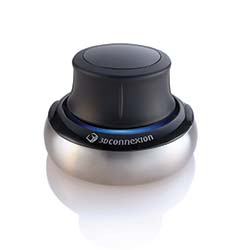 All of you 3D designers get ready for this! 3Dconnexion (a Logitech company) has come out with what’s basically a 3D mouse called the SpaceNavigator. It’s primarily designed to work with 3D programs, such as 3ds Max, Maya, and Adobe Photoshop CS3 Extended, to name a few (visit www.3dconnexion.com for a complete list of supported applications). And it’s pretty amazing when you use it with Google Earth. The SpaceNavigator is also a very cool-looking piece of equipment that will have everyone trying to figure out exactly what’s sitting on your desk.
The SpaceNavigator is not like your conventional mouse because it allows you to navigate through 3D space with ease. Simply push, pull, tilt, or twist the controller to pan, zoom, and rotate—you can even do all three at once. There are also two programmable function keys.
What’s really cool is that it’s designed to work with your mouse. I’ve been using this with both 3ds Max and Maya. Here’s how it works: I use the SpaceNavigator with my left hand then use my mouse for normal controls like menu selection commands and manipulation controls. This took a little getting used to and the manual was virtually nonexistent, so a little trial and error was necessary. Once I got the hang of it though, I was flying through my scenes and through Google Earth like a fighter pilot! The Space Navigator responds like a precision joystick that’s fluid and has great control.
This will definitely become a part of my workstation because it gives me flexibility that I haven’t had before. If it weren’t for the lack of a real manual, this would get 5 stars.— Bruce Bicknell
PRICE: $99 (standard edition), $59 (personal edition)
FROM: 3Dconnexion
PHONE: 408-376-2500
WEB: www.3dconnexion.com
FOR: Mac and Windows
RATING: 4.5
LAYERS VERDICT
HOT Precision control; ease of use; cool looks
NOT Lack of detailed manual