
MultiPage 4 for Illustrator
Plug-In Creates Multipage Layouts
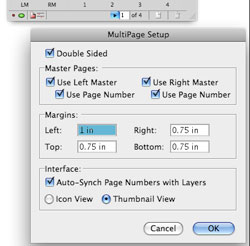 If you don’t have an entire CS3 suite, which includes InDesign, you might be inclined to use Illustrator as a page-layout program. After all, it has most of the basic typographic features of InDesign, including paragraph and character styles. But there’s always one feature many Illustrator users clamor for: multipage layout. Whether Illustrator will ever have that feature remains to be seen. Fortunately with MultiPage 4 for Illustrator, you don’t have to wait.
If you’re familiar with page-layout programs, MultiPage is easy to use. It has master page features—including auto-page numbering—and the ability to export the pages as a single, multipage PDF or as separate PDFs. MultiPage uses layers in a clever way: by turning top-level layers into individual pages, new pages become new layers. If you already have layers in your document, be sure you make them sublayers before activating MultiPage.
When printing or exporting (to PDF, EPS, or JPEG), you have to do it through the MultiPage palette. If you send the Illustrator file to someone without MultiPage, you must convert the auto-page numbers into regular text. When exporting to PDF, take care that you don’t export with top-level Illustrator layers converting to Acrobat layers.
For occasional use, the MultiPage features could be done manually; but if you’re doing any long-term projects in Illustrator, this plug-in pays for itself very quickly.—David Creamer
PRICE: $99
FROM: Hot Door, Inc.
WEB: www.hotdoor.com
RATING: 4.5
LAYERS VERDICT
HOT Page-layout palette
NOT Nothing major