Author: Corey Barker
Corey is the newest education and curriculum developer for the National Association of Photoshop Professionals. He is a graduate of the Ringling School of Art & Design in Sarasota, Fl, with a degree in Illustration. Over the years, Corey has worked as a graphic artist in a variety of disciplines such as illustration, commercial design, large format printing, motion graphics, web design and photography. His expertise in Photoshop and Illustrator have earned him numerous awards in illustration, graphic design and photography. Using Photoshop since Version 2, his expertise and creativity have evolved exponentially with every new version, which makes Corey an invaluable addition to the NAPP team.
Cool tutorial Corey, everything here was uncharted territories for me. Live trace might just make me lazy but will definitely come in handy come crunch time. Thanks for sharing.
[...] I have over at LayersMagazine.com on getting creative color effects on image from Photoshop using Live Trace in Adobe Illustrator. I also utilize the Kuler color feature to seek out color swatches in a free online database. [...]
[...] Live Trace Tricks in Adobe Illustrator This video tutorial from Layers Magazine is more about using Live Trace for color photographs, but I thought I’d include it since it’s a nice variation and describes the Live Paint Bucket feature very well. [...]
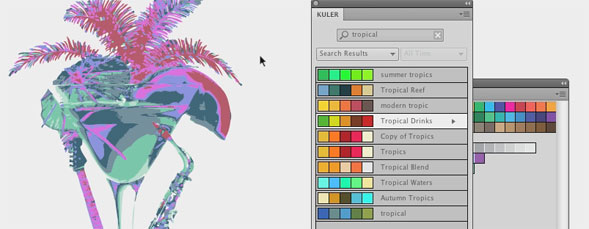
[...] Live Trace Tricks in Adobe Illustrator This video tutorial from Layers Magazine is more about using Live Trace for color photographs, but I thought I’d include it since it’s a nice variation and describes the Live Paint Bucket feature very well. [...]
[...] Live Trace Tricks in Adobe Illustrator This video tutorial from Layers Magazine is more about using Live Trace for color photographs, but I thought I’d include it since it’s a nice variation and describes the Live Paint Bucket feature very well. [...]
[...] View Post [...]
Cool tutorial Corey, everything here was uncharted territories for me. Live trace might just make me lazy but will definitely come in handy come crunch time. Thanks for sharing.
This is so cool. Love the Re-color Artwork tool. Such an easy way to fill your tonal images up with color.
Thank You for the tip
[...] I have over at LayersMagazine.com on getting creative color effects on image from Photoshop using Live Trace in Adobe Illustrator. I also utilize the Kuler color feature to seek out color swatches in a free online database. [...]
Its really cool and also very helpful. Love it! Thanks for the post..
Thank you for such an insightful tut!!
[...] this link: Live Trace Tricks in Adobe Illustrator Tags: composite-created, cool-way, illustrator, tutorial, vector-graphic, video [...]
Absolutely amazed!
O
Hey, Trying to view your blog on an EVO 4G and am having issues. I can’t get the menu to load right. Just wanted you to know, Cheers!
[...] Live Trace Tricks in Adobe Illustrator This video tutorial from Layers Magazine is more about using Live Trace for color photographs, but I thought I’d include it since it’s a nice variation and describes the Live Paint Bucket feature very well. [...]
[...] Live Trace Tricks in Adobe Illustrator This video tutorial from Layers Magazine is more about using Live Trace for color photographs, but I thought I’d include it since it’s a nice variation and describes the Live Paint Bucket feature very well. [...]
[...] Live Trace Tricks in Adobe Illustrator This video tutorial from Layers Magazine is more about using Live Trace for color photographs, but I thought I’d include it since it’s a nice variation and describes the Live Paint Bucket feature very well. [...]
I love forgathering utile information , this post has got me even more info! .

