
The Cerise Quad-Core Workstation
SOMETIMES BIGGER IS BETTER
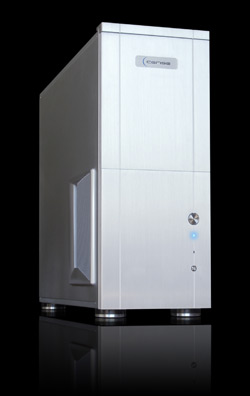 I have to admit that when I saw the size of the box being delivered to my front door, I thought I was getting a small appliance for my kitchen but soon found out that it was the Cerise Quad-Core Workstation for this review. All kidding aside, this machine is a model of efficiency. From the sleek all-aluminum tower to the retractable I/O ports on top of the machine, the designers at Cerise have something pretty good going here. This workstation is truly a unique custom solution that’s built for photographers, videographers, and multimedia users.
But first, let’s focus on what it doesn’t have. It doesn’t have the “gamer” frills (you know, everything lights up; is overclocked within an inch of its life; and is optimized for gaming, not multimedia). I love my games but my work comes first, so I need my machine to be optimized to run my Adobe, Autodesk, and various other graphics and multimedia apps that I need to earn a living. I can live with Halo running a bit slower but not my Photoshop!
So what makes this machine cook? The unit tested ran Microsoft XP 32-Bit Home Edition powered by an Intel Core 2 Quad Q6700 (2.66 GHz), 4 GB of 800-MHz DDR2 memory, and a 512-MB GeForce 8800 GT graphics card that provided adequate horsepower to tackle the multimedia tasks I tossed its way. Also included in this configuration are five (yes, five) 500-GB hard drives. One hard drive is for the OS and programs and the other four are set up in RAID 5 configuration for editing, ensuring that no data will ever be lost if there’s a drive failure. What’s really cool about this setup is that it uses a hardware RAID card instead of the typical software solution. The hardware card handles the bottlenecking that typically happens when you’re trying to access files on your computer, allowing you more time to produce and less time waiting for things to happen. I’m always looking for ways to improve productivity, so that was a welcomed feature. (The unit also came with an 18X DVD+R DVD burner and 7.1 channel audio integrated into the motherboard.)
The computer is configured with strategically placed fans and one large cooling vent that cuts through the box to ensure maximum airflow, keeping everything nice and cool so that it doesn’t become a space heater under your desk. This also helps keep the machine operating quietly. In fact, it runs so quietly you may find yourself checking to see if the machine is turned on. The inside of the box is pretty impressive as well with every cable, card, fan, and screw in its place and neatly put together.
Now that I’ve told you about the features, you probably want to know how it actually performed. Sure, I ran all of the benchmarks (Cinebench R10: 9526; OpenGL: 5292; PS CS3 Action Set: 0:25; and Windows Media Encoder: 0:54) and yes, this thing is fast. The numbers are nice but what it boils down to is real-world performance. On any given day in my studio, I could be (and usually am) working on anything from photography to animation, then throw in some video editing and voiceover work for good measure. So I loaded everything I had on this box. I can honestly say this machine handled everything I threw at it without a grunt or lag. At one point I had more than 20 images open in Photoshop; a 20-minute After Effects composition rendering; while tweaking a problem in Maya for a client—and I had no problems with lag or hang-ups. It took it like a champ. And for the month that I used the Cerise as my main workstation, it breezed right through even the most difficult tasks. I do have to say, however, that if you’re doing a lot of multimedia or animation, I would strongly suggest upgrading to a more powerful video card to take advantage of rendering times.
For the price and capabilities, the Cerise Quad-Core Workstation is definitely a machine worth considering for your workspace, as they can set you up with a box that meets your needs, not something that’s made for the masses.—Bruce Bicknell
PRICE: $3,479 (as tested)
FROM: Cerise Computers, LLC
WEB: www.cerise.com
RATING: 4
LAYERS VERDICT
HOT Hardware RAID Controller; quiet and cool; no bloatware
NOT Box is huge; price is up there