
Pixelmator 1.5
LAYER-BASED IMAGE EDITOR FOR MAC OS X
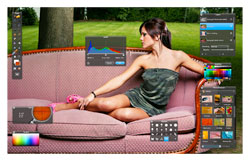 Pixelmator has a practical feature set for creating, editing, and enhancing images. Originally released in 2007, version 1.5 for Mac is only compatible with Leopard and Snow Leopard (Mac OS X 10.5.7 or later), taking advantage of Apple’s OS X Core Image technology. And it’s fast: booting in two seconds and processing and applying one of 50 effects filters to large files in approximately three seconds.
Pixelmator does a lot within its layer-based architecture, 10 palettes, and set of 20 tools. Added features include: Save for Web; image slicing; a trim tool; and you can send a copy of your image to a new Mail message or your iPhoto library. Also, with one click, Pixelmator can take a picture via Apple iSight and add it as a layer into your composition.
If you work with Photoshop, Pixelmator’s user interface—configurable palettes and a toolbar float on a slick, black background—will be warm, familiar ground, with many of the same keyboard commands. It supports more than 100 file formats including PSD, DNG, and most proprietary RAW formats. Its layer-based architecture has layer masks and blending modes but it lacks nondestructive adjustment layers and blending styles.
Pixelmator offers an excellent brush and gradient tool and there’s a wide range of selection tools including a clever magic wand that visually shows the selection as you drag across targeted areas. The extensive filter menu has some wonderful effects with unique digital ropes that allow you to select the center of the filter’s effect. Third-party plug-ins are supported by Apple’s Core Image and Quartz Composer technology.
What Pixelmator needs is to spruce up the text tools’ options and have a photo browser that can navigate freely. Currently the browser can only open files saved to iPhoto or your Home picture folder. But Pixelmator is a powerful program worth downloading and trying.—Steve Baczewski
Company: Pixelmator Team Ltd.
Price: $59
Web: www.pixelmator.com
Rating: 4.5
Hot: Fast
Not: Photo browser