
Formula for the Modern Show Opening
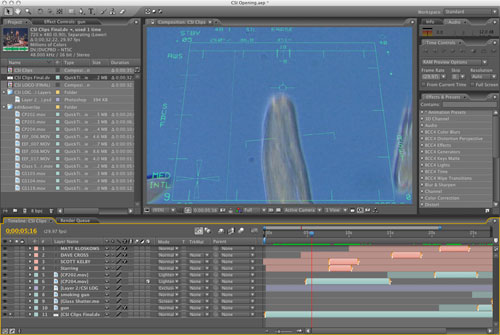
Question: Rod, I need to make one of those crazy, frenetic, spastic, seizure-inducing show openings like you see on MTV and primetime television. I’m far from being a video guru; it’s just something I’ve been asked to do at my company as the resident “video guy.” Can you get me started in the right direction?
Answer: I can do better than that! I’m going to give you the formula that you can follow step-by-step to create your own dramatic, controlled chaos show opening regardless of what nonlinear editor (NLE) you use.
Like anything else in the world of video, you’re going to want to tell a story in your show opening, even if it’s only 30 seconds long. Specifically, you want to tell the story of the video presentation that you’re about to show, but in the most exciting and dramatic fashion possible. The purpose of the opening is to grab the audience’s attention and prepare them for what’s about to come.
Since the beginning of television, shows of any particular genre have almost always followed a set pattern of characteristics (what’s known as formulaic television). It’s what makes daytime soaps on one network look like daytime soaps on another network (same for sitcoms, medical dramas, and so on). In more recent years, show openings have also fallen into this formulaic style by following a specific set of design characteristics to create a specific type of look or emotional appeal.
To create the modern, frenetic show opening, you’ll need a lot of short video clips, most about a second or less in length. Some clips will be from the video presentation that’s to follow, but some won’t have anything to do with the show whatsoever! You also need some animated elements, or a least the ability to do some basic animation within your preferred NLE. Lastly, you’ll want a set of filters that can add glows and blurs to both video clips and animated elements. Here’s your list of formula ingredients:
- 15–20 stock video clips for your show category or location (medical, military, legal, law enforcement, home & garden, urban, countryside, beach, etc.)
- 10–15 video clips of your actors, main product, or of the specific subject of your video presentation
- 5–10 video clips that have absolutely nothing to do with your subject, but look really cool (slow motion of hummingbird flying, time-lapse footage of a busy street, scorpion walking across the desert, butterflies, volcano erupting, etc.)
- 5–10 animated elements (such as random numbers, grids, and lines) moving onscreen
- 0–5 text elements (actors’ names, product name, keywords, etc.)
- 1 high-energy music track (can be substituted for very eclectic musical track)
- 1 blur filter set
- 1 glow filter set
Instructions
Now that you’ve assembled your ingredients, you need to follow the recipe.
STEP ONE: In your favorite video editor, combine the stock footage video clips (about your subject or location) with the shots of your actors. For your actor shots, it’s best if you have them performing some kind of action or task. You want to make it look like the viewer is just catching a quick glimpse of their life and routine.
Make sure that no clip is longer than 2 seconds long, with the majority being 1 second or less. Do this until you have the basic outline of the message you want to communicate in 30 seconds (or however long you want your opening to be).
STEP TWO: Now go back into your Timeline and drop in the clips that have nothing to do with your storyline, but look really cool (slow motion of hummingbird flying, time-lapse footage of a busy street, etc.).
STEP THREE: Add high-energy (or eclectic) music and position the major action in your video clips to begin on the downbeat of your music track. You can also add any sound effects you think are needed at this time.
STEP FOUR: Import/move this rough draft of your opening into the compositing module of your NLE or into a specialized compositing program such as Adobe After Effects.
STEP FIVE: Add random numbers, grids, streaking lines, and other animated elements to taste. These need to be composited over (on top of) the existing rough draft of your video Timeline.
STEP SIX: Type in the name of your actors and place these text layers onscreen where you want them to appear. This will usually be on top of a video clip for that actor, but it’s cool to let the names stay onscreen and bleed over some miscellaneous stock footage. Leave the names up long enough to read (3 to 5 seconds).
STEP SEVEN: Add an animation preset to your text (or animate manually) so that the text either scales, dissolves, or animates on- and offscreen.
STEP EIGHT: Add a blur or glow (or combination of both) to your text to add that extra bit of pizzazz.
STEP NINE: Look for other animated elements or video clips where you can add blurs and glows to give the whole piece a more otherworldly, mysterious appearance.
STEP TEN: Overlay a last-minute element such as glass shattering, gunfire, or an explosion to heighten the since of drama or suspense to your opening.
STEP ELEVEN: Blend in the show logo at the end of your opening and fade out most of the background elements…but not all. Leave at least one background element for effect.
STEP TWELVE: Add this entire sequence (including music and sound effects) to the beginning of your video presentation and voilà—one supercool, frenetic, modern show opening.