
Eye-Fi Card
PRACTICAL WIRELESS MEMORY CARD HAS LIMITATIONS
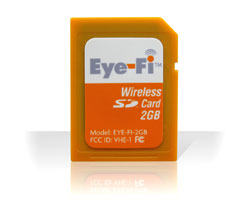 Kudos to Eye-Fi, Inc. for making it increasingly practical to send files wirelessly from your camera to your computer using the Eye-Fi Card. Eye-Fi built a Wi-Fi antenna into an SD memory card that communicates with your router for uploading. For the most part, it’s effortless and instantaneous with no wires or adapters to fuss with; however, it has limitations. The current version of the Eye-Fi Card comes only as a 2-GB, SD memory card and supports only JPEG format.
On setup, you can choose to upload files to one of 20 on-line photo-album -sharing sites, such as Flickr or Shutterfly, or upload to a designated folder on your computer. The Eye-Fi Card uses power from your camera to transfer files, which are neatly organized in folders by the date they were shot. Battery drain isn’t an issue but a wall adapter is a good idea for large uploads. Upload speed depends on camera distance from the router, router quality, and file size. Upload speed picks up dramatically when transferring to a single designation.
At times, the process is erratic but I found that turning the camera off and then on again solves most quirky behavior. Eye-Fi’s Wi-Fi antenna supports 802.11g and 802.11b wireless networks. Home is the optimal situation to use the Eye-Fi within short range of your router, as I found public spots, such as the airport or an Internet cafe, may or may not work secondary to distance from the router. There’s also no connection to networks with a splash screen that needs authentication.—Steve Baczewski
PRICE: $99.99
FROM: Eye-Fi, Inc.
WEB: www.eye.fi
RATING: 3
LAYERS VERDICT
HOT Simple setup
NOT Limited signal strength, options, and appeal