CS3 Hates Me!
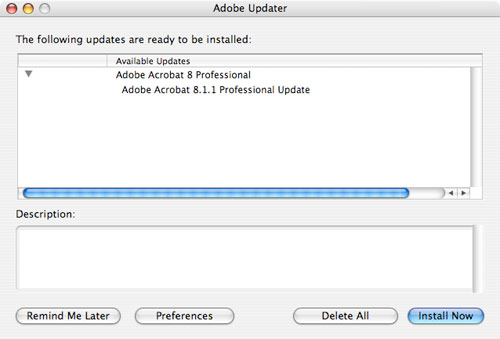
Question: I can’t get any of my Adobe software to update. No matter what I try, nothing ever downloads to my Mac. I think CS3 hates me. Have you ever heard of this?
Answer: Believe it or not, this is actually a fairly common problem. The Adobe Updater is a sophisticated piece of software that looks at the software installed on your machine (along with appropriate licenses), queries the updates database, and then downloads the appropriate update for you—for every one of your Adobe applications! There are a number of possibilities at play here, so let’s look at some common problems along with their appropriate solutions to find the right fit for you.
Keeps apps in original location: One kind of trouble occurs when a user installs a program and then moves that program to a different folder later on. Once you install an Adobe app, whether on an internal or external drive, it’s best to leave it there indefinitely. If you think this is your problem, just try moving the software back to its original folder location and try the updater again.
Fix permissions: On Macs, you may just need to run a simple permissions fix to get your updates flowing through correctly. Just go to Applications/Utilities/Disk Utility, select your hard drive, and then run Repair Disk Permissions. When it’s finished, try running the Adobe Updater again and see if this fixes your problem.
Delete cache: If repairing your permissions doesn’t work, then you may want to try deleting the cache files for your installation of CS3. But be forewarned, you’ll need to have your serial number handy before attempting this trick:
1. Launch any application from the suite and deactivate it (under the Help menu). The suite apps will close.
2. Navigate to Library\Application Support/Adobe/Adobe PCD/cache/cache.db (PC: C:\Program Files\Common Files\Adobe\Adobe PCD\cache\cache.db).
3. Drag the file cache.db to your desktop or Trash.
4. Launch any of the applications in CS3 again and enter your serial number when prompted.
5. Activate the software.
6. Check for available updates.
Throw away Updater folders: If that doesn’t work, you can try throwing away the Updater and Updater5 folders. On Macs, you’ll find them in Library/Application Support/Adobe. You’ll also need to delete the same folders in the User library ([Username]/Library/Application Support/Adobe). In Windows, you’ll find them in C:\Program Files\Common Files\Adobe and in C:\Documents and Settings\[Username]\Application Data\Adobe.
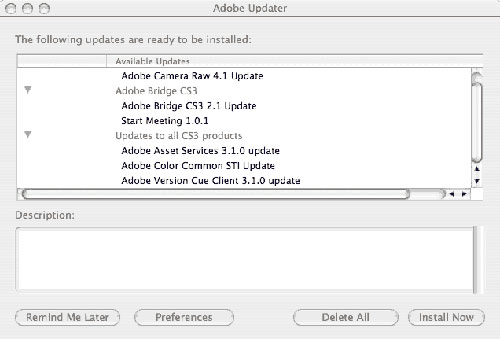
Delete All: Another problem occurs when the Adobe Updater list won’t update to include new updates if there’s a pending installation waiting. The solution is to hit the Delete All button to get rid of all of the existing pending updates. Then the updater will ping the website and list all of the available updates.
No updates for you
Unfortunately, I’ve recently been having the same problem and none of the solutions I’ve mentioned so far have worked for my specific setup. I have a desktop Mac Pro with the full CS3 Production Premium suite and it gets any and all updates from Adobe without any incidents whatsoever. On the same network, I also have a MacBook Pro (laptop) with a second install of the CS3 Production Premium suite. (In case you weren’t aware, Adobe allows for two copies of its software to be installed for just this purpose: one on your desktop and one on your laptop—all with the same serial number.)
I realized I haven’t gotten any updates on this machine for any of the CS3 apps. So I wrote to some friends at Adobe and they recommended that I run the Adobe Updater (Mac: Applications/Utilities/Adobe Utilities/Adobe Updater5 [PC: C:\Program Files\Common Files\Adobe\Updater 5]) and choose Delete All and then try updating again. The Adobe Updater window should look something like this:
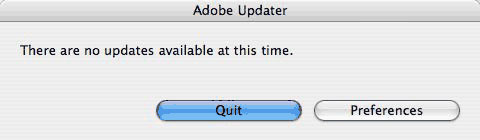
Only one problem, I can’t even get to that screen! When I launch the Adobe Updater it gives me this screen where the only option is to launch the Preferences dialog:
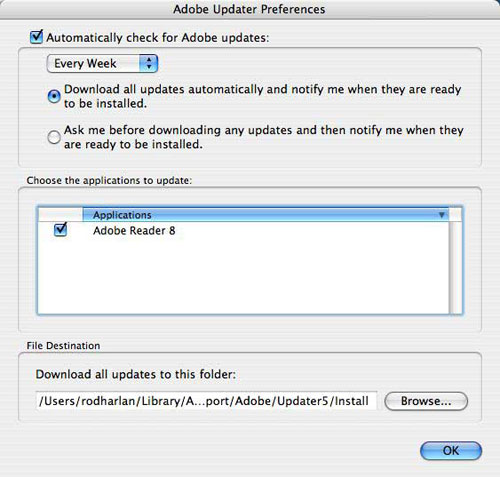
So I launch the Preferences dialog and here’s where I realize the core of my problem—the updater doesn’t see any of my CS3 apps! None of them. To the Updater, it’s like they were never installed. The only Adobe application it sees on my entire drive is the Adobe Reader. Take a look:
So the solution is that I need to force the updater to see all of my Adobe CS3 apps, something that I’m currently trying to find a workaround for. I sent my aum.log file (in my [Username]/Library/Application Support/Adobe:Updater5 folder) to the good folks at Adobe to investigate the problem further but unfortunately all they were able to do was confirm the problem.
So sadly, it seems the only way to fix this problem, according to Adobe, is to run the Adobe CS3Clean Script at level 4. This special script available for both Windows and Macs will remove all existing Adobe apps from your system when you run it at level 4. This includes CS2 versions and earlier. (Note: The script actually only shows options for levels 1 and 2, but you can type in 4 to remove all Adobe apps.) It wipes everything out so make sure you backup your Lightroom galleries, Acrobat documents, etc. It basically returns your system to a pre-Adobe state and if you reinstall the CS3 software from this state, you should be back in working order. Yes, this is a huge pain, but it’s the only solution I’ve found so far. The latest versions of the CS3Clean Scripts are located here: www.adobe.com/support/contact/cs3clean.html.
Good luck!