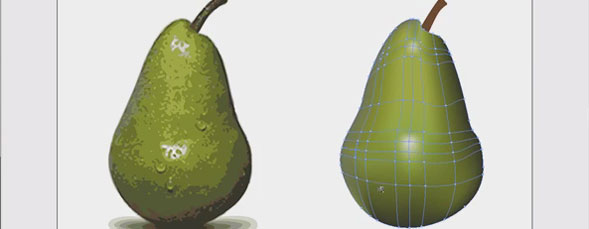
AJ Wood shows Illustrator users a technique for using the Live Trace and gradient Mesh functions to create a colored illustration.

Author: A.J. Wood
A.J. Wood is an Adobe Community Professional & Adobe Certified Instructor in Photoshop, Lightroom & InDesign. He is a NAPP Evangelist, belongs to the Professional Photographers of America (PPA) and is an instructor for the Special Kids Photography of America (SKPA). Ranked as the #1 Adobe instructor worldwide, more than once, A.J. actively creates content for the art & technology communities. You can catch him daily at ajwood.com
Why didn’t you just sample from the original image? Good tutorial though, I did a project with my mesh on a layer on top of the original picture like a templette.
Don
Excellent, very well explained, you got a great voice by the way..!
very helpful tutorial, thank you. i never gotten used to the mesh tool. from now on it’s like gradients all over the place.
btw, i think the shortcut for the lasso tool is quite clever. the letter Q looks kind of like a lasso. that is how i remember the shortcut.
You guys at Kelby need to invest in some HD equipment. These videos at full screen look like crap. A shame since this is such a good tutorial (as are so many others).
Really Excellent tutorial very helpful to learn.Great posting.
I stumbled upon this using Stumble Upon, Im glad I did! Thanks so much for this tip, I will use it frequently from now on.
You shawed me another way for using gradient meshe
thanks a lot.
thankyou for making this vid, im a first year student of graphic design and still trying to get my head around all the tools of illustrator and this tutorial was well explained and easy to follow
Outstanding!! Thanks a lot for this excellent idea!!
Any printing issues when printing a document using this technique???
nice tutorial… really help me..